What is Google Cloud AI?
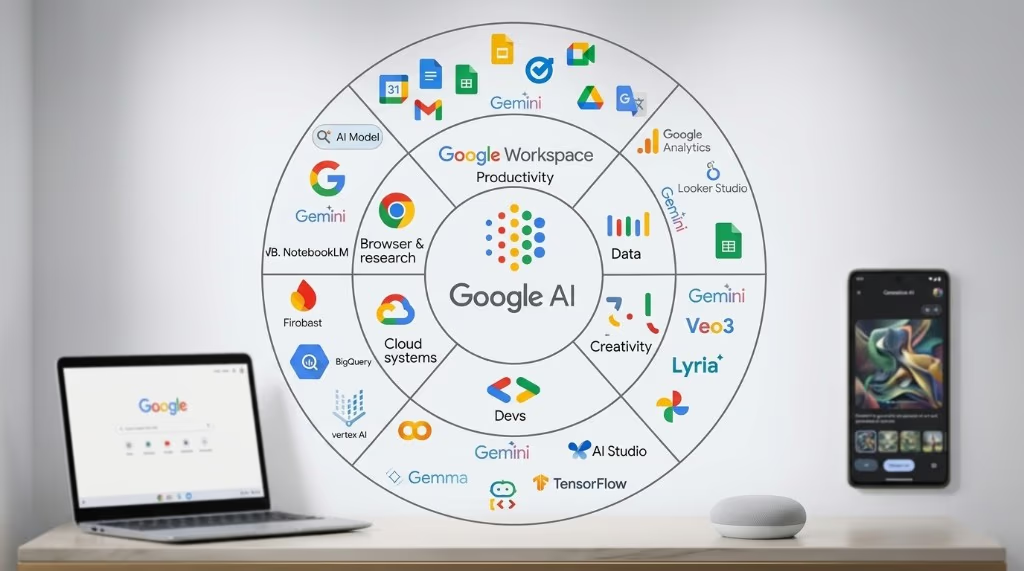
Google Cloud AI is Google’s suite of cloud-based AI products and infrastructure for developers, data scientists, and enterprises. It covers everything from simple API calls that add AI features to an app in minutes, to a full machine learning platform for training, deploying, and monitoring custom models at scale.
The ecosystem is larger than most people expect. Google Cloud AI is not one product – it is a stack of products at different abstraction levels, designed for different users and different levels of AI expertise. Understanding which layer you need saves significant time and cost.
For background on AI concepts, see: What Is Artificial Intelligence? and What Is Generative AI?
Three layers: how Google Cloud AI is organized
The clearest way to navigate Google Cloud AI is to think in three layers, ordered by how much ML expertise they require.
-
Gemini API (lowest barrier to entry): Call a generative AI model via API. You send a prompt, you get a response. No training, no infrastructure management. Best for developers building applications on top of language, vision, or multimodal AI.
-
Vertex AI (full ML platform): Build, train, fine-tune, deploy, and monitor ML models – both generative AI and classical ML. Best for ML engineers and data scientists who need control over the full model lifecycle, custom training, or production MLOps pipelines.
-
Pre-built AI APIs (highest abstraction, no ML required): Call specialized APIs for Vision, Speech, Translation, and Natural Language. Each does one thing well. Best for non-ML teams adding specific AI capabilities to an existing product.
Google Agentspace is a fourth, separate category for enterprise buyers who need an AI-powered knowledge base and agent platform for internal use – not a development tool but a deployed enterprise product.
Layer 1 – Gemini API: start here for most projects
The Gemini API, available through Google AI for Developers (ai.google.dev), is the fastest way to build applications using Google’s generative AI models. It requires no ML expertise and no Google Cloud account to start – you can get an API key and call a model within minutes.
The Gemini model family
The Gemini API gives access to multiple models at different price and capability points. As of mid-2025, the current generation is Gemini 2.5:
- Gemini 2.5 Flash: The speed-optimized model for high-throughput applications where cost and latency matter. Supports a 1 million token context window. Priced at $0.30 per million input tokens and $2.50 per million output tokens on the paid tier.
- Gemini 2.5 Flash-Lite: The lowest-cost option at $0.10 per million input tokens. Good for high-volume, simpler tasks where maximum capability is not needed.
- Gemini 2.5 Pro: The highest-capability model with advanced reasoning and a 1 million token context window. Priced at $1.25-$4.00 per million input tokens depending on context length. Best for complex reasoning, code generation, and document analysis.
All Gemini models are natively multimodal: they process text, images, audio, and video in the same prompt. A single API call can take in a PDF, an image, and a text question together.
Free tier and rate limits
The Gemini API has a free tier that includes access to Flash models with limited rate limits. On the free tier, content may be used to improve Google products – a consideration for anything sensitive. Paid tiers unlock higher rate limits and remove that data usage clause. Tier progression is automatic based on spend history: Tier 1 begins at any billing account, Tier 2 after $100 cumulative spend, Tier 3 after $1,000.
Key capabilities
- Grounding with Google Search: Connect a Gemini model to live Google Search results so responses include up-to-date information rather than relying solely on training data.
- Function calling: Define functions your application can execute, and Gemini will call them when appropriate – this is the mechanism for building agents that interact with external APIs.
- Structured output: Request responses in JSON schema format, which is essential for reliable integration with downstream code.
- Long context: The 1 million token context window means you can pass entire codebases, books, or long document collections into a single prompt.
- Cost optimization via batch: The Batch API reduces costs by approximately 50% for asynchronous workloads where latency is not critical.
Gemini API vs. Vertex AI for Gemini
Gemini models are also available through Vertex AI. The functional difference is governance and enterprise controls: Vertex AI offers VPC-SC (Virtual Private Cloud Service Controls), customer-managed encryption keys, data residency commitments, and audit logs. For a startup prototype, the Gemini API directly is simpler and cheaper. For a production enterprise deployment with compliance requirements, Vertex AI is the right home.
Layer 2 – Vertex AI: the full ML platform
Vertex AI is Google Cloud’s unified platform for building, deploying, and scaling both generative AI and traditional machine learning. Google describes it as “a unified, open platform” – the key word being open: it is not locked to Google’s models. You can run Gemini, Claude (from Anthropic), Llama (Meta), Mistral, and custom models all within the same platform.
Who Vertex AI is for
Vertex AI is designed for three distinct audiences:
- Application developers who want to build production-ready generative AI applications with enterprise governance using Vertex AI Studio and Agent Builder.
- ML engineers and data scientists who need the full ML lifecycle: data prep, training, evaluation, deployment, and monitoring with custom models.
- IT and platform teams who manage AI infrastructure, governance, security controls, and compliance across the organization.
Vertex AI Studio
Vertex AI Studio is the browser-based interface for working with generative AI. It provides a prompt design environment where you can experiment with Gemini and other models without writing code. From Studio, you can also trigger fine-tuning jobs, manage deployed models, and set up evaluations. It is the starting point for teams transitioning from prototype to production.
Agent Builder and Agent Engine
For building AI agents – systems that can plan and execute multi-step tasks using tools and external data – Vertex AI provides two components:
- Agent Development Kit (ADK): An open-source framework for building and orchestrating agents. Supports grounding (connecting agents to real-time data via Google Search or RAG), function calling, and multi-agent coordination.
- Vertex AI Agent Engine: A managed, serverless runtime for deploying ADK agents at scale. Handles session management, dependency installation, and streaming. Each deployed agent gets an Agent Identity – an IAM principal – for security and audit trails.
MLOps tools for traditional ML
For teams training custom ML models (not just using foundation models via API), Vertex AI provides a complete set of MLOps infrastructure:
- Vertex AI Training: Run custom training code serverlessly on-demand, or on reserved accelerator clusters for large jobs. Supports GPU and Google’s own TPU hardware.
- Vertex AI Pipelines: Orchestrate and automate ML workflows as reusable, versioned pipelines – the standard pattern for reproducible ML in production.
- Vertex AI Model Registry: Manage model versions, track lineage, and control what is deployed where.
- Vertex AI Model Monitoring: Detect training-serving skew and inference drift on deployed models – the mechanism for catching model degradation before it becomes a production incident.
- Vertex AI Feature Store: Manage and serve features consistently across training and inference, preventing the common problem of features looking different at train time versus serve time.
- Vertex AI Experiments: Track hyperparameter experiments and model configurations so teams can reproduce and compare results.
BigQuery integration
A practical advantage of Vertex AI for Google Cloud users is its tight integration with BigQuery. BigQuery ML lets you train and run ML models directly on data in BigQuery using SQL – no data export, no separate compute setup. For teams whose data already lives in BigQuery, this is a meaningful reduction in pipeline complexity.
Developer tools
Vertex AI supports several development environments:
- Vertex AI SDK (Python): Comprehensive toolkit for automating ML workflows programmatically.
- Colab Enterprise: Managed collaborative notebook environment with Google Cloud security and access controls – useful for teams that want Jupyter-style notebooks without managing infrastructure.
- Vertex AI Workbench: A Jupyter-based environment for data science work, closer to a full IDE than Colab Enterprise.
- Terraform support: Provision Vertex AI resources using infrastructure-as-code for teams with production deployment discipline.
AutoML and tabular data on Vertex AI
AutoML was Google’s earlier approach to no-code/low-code ML: train a custom model on your own data without writing training code. Parts of AutoML are still active and useful; others have been deprecated.
What is still available
AutoML for tabular data remains fully available through Vertex AI. It lets you train classification and regression models on structured data (think spreadsheet-style data: customer records, transaction logs, inventory data) by uploading a dataset and defining the target variable. No data science background is required to get a working model. This is still a reasonable approach for business problems that have labeled tabular data and do not require deep learning.
What has been deprecated
AutoML Text is deprecated and being phased out. Google’s recommendation is to migrate to Gemini for text-based tasks, which offers better performance and multimodal capabilities. Legacy AutoML Text resources were available until June 2025; new projects should use Gemini instead.
When to use AutoML Tabular vs. custom training
AutoML Tabular is the right choice when: you have clean labeled data, the task is classification or regression, and you do not have ML engineering capacity to write and tune training code. Custom training via Vertex AI Training is better when: you need control over the model architecture, you have domain-specific requirements, or you are training deep learning models on unstructured data.
Layer 3 – pre-built AI APIs: no ML required
For teams that need AI capabilities without building or training models, Google Cloud offers a set of specialized, pre-built APIs. Each is a managed service: you call an endpoint, pass data, and receive structured results. No GPUs, no training pipelines, no ML expertise required.
Vision AI
Google Cloud Vision API analyzes images and returns structured results: image labels (what is depicted), face detection (not identification – landmarks and expression analysis), landmark detection, OCR (extract text from images), object localization, and explicit content detection. Use cases include: content moderation at scale, document digitization, inventory cataloging from photos, and accessibility features for image-heavy applications.
Speech-to-Text
Google Cloud Speech-to-Text converts audio to text using Chirp 3, Google’s speech foundation model trained on millions of hours of audio. It supports 85+ languages and language variants, real-time streaming transcription, and speech adaptation for domain-specific vocabulary (useful for medical, legal, or technical terminology). Enterprise features include data residency options and customer-managed encryption keys. Pricing is per audio minute processed.
Cloud Translation
Cloud Translation comes in two tiers. Translation Basic uses Neural Machine Translation for fast, general-purpose translation across 189 languages – appropriate for website content, notifications, and user-generated text. Translation Advanced adds customization: you can fine-tune translation for your domain’s specific terminology, translate formatted documents (Word, PDF, PowerPoint) with layout preservation, and run batch translations at scale. An Adaptive Translation option combines large language models with small domain-specific datasets to capture your specific brand voice or style.
Natural Language AI
The Natural Language API derives insights from unstructured text: sentiment analysis (positive/negative/neutral with confidence scores), entity recognition (people, places, organizations, consumer goods), entity sentiment (sentiment about specific entities, not just the document as a whole), text classification into predefined categories, and syntax analysis. This is useful for processing support tickets, reviews, social media, or any high-volume text where you need structured signals without reading everything manually.
Video AI
Video Intelligence API analyzes video content at scale: label detection, shot change detection, object tracking across frames, explicit content detection, and speech transcription from video. Use cases include media archives, content moderation, and accessibility tooling for video libraries.
When to use pre-built APIs vs. Gemini
The pre-built APIs are optimized for high-volume, well-defined tasks at predictable per-unit pricing. If you need to process 10,000 images per hour for OCR, Vision AI is the right tool. If you need to ask open-ended questions about an image, or combine vision with reasoning (“describe what is unusual about this photo and explain why”), Gemini is the right tool. The boundary is: structured outputs for defined tasks versus flexible reasoning and generation.
Google Agentspace: AI for enterprise search and agents
Google Agentspace Enterprise is a deployed enterprise product, not a development tool. It gives organizations an internal AI assistant that can search and synthesize information across enterprise data sources and run custom agents for specific business functions.
What it does
Agentspace Enterprise provides multimodal search across structured and unstructured enterprise data using prebuilt connectors for widely used business systems: Confluence, Google Drive, Jira, Microsoft SharePoint, ServiceNow, GitHub, Notion, Shopify, and Google Chat. Employees can search across these disparate systems in natural language and receive synthesized answers with source citations, rather than navigating between separate search interfaces.
The Agentspace Enterprise Plus tier adds custom AI agents – pre-configured agents that automate specific business functions in marketing, finance, legal, engineering, and other departments. These agents can retrieve documents, draft outputs, and interact with connected systems without employees needing to prompt-engineer or build anything themselves.
Enterprise controls
Agentspace respects existing access controls: employees only see results from data sources they already have permission to access, enforced through SSO and permissions models. This is critical for enterprise adoption – an internal search tool that leaks sensitive documents across teams is a liability, not a benefit.
Who this is for
Agentspace is for IT or operations teams evaluating enterprise AI platforms – analogous to Microsoft Copilot for M365 users, but for organizations on Google Workspace or mixed environments. It is not a developer tool and does not require ML expertise to deploy.
Model Garden: not just Google models
One underappreciated aspect of Vertex AI is Model Garden – a catalog of over 200 enterprise-ready models from three sources: Google’s own models, third-party commercial models, and open-source models.
What is available
- Google models: The full Gemini family (Gemini 3 Flash and Pro are the current flagship), plus Imagen (image generation), Veo (video generation), and Chirp (speech).
- Third-party commercial models: Anthropic’s Claude models, available as fully managed model-as-a-service APIs. Mistral AI models are also available.
- Open-source models: Meta’s Llama family and Google’s own open-weight Gemma models – available for deployment and fine-tuning within your own Vertex AI environment.
Why model choice matters
Being able to switch between Claude, Gemini, and Llama within the same platform and billing account is a practical advantage. Teams can use different models for different tasks (for example: Gemini for tasks that benefit from Google Search grounding, Claude for tasks requiring careful long-document reasoning) without managing multiple vendor relationships or separate infrastructure. As model capabilities shift, you can move to a different model without rearchitecting your deployment.
Pricing overview
Google Cloud AI pricing varies significantly by product and usage pattern. The following is a summary of published rates as of 2025-2026. Always verify current pricing on Google’s official pricing pages before budgeting, as rates change.
Gemini API (developer tier, per 1 million tokens)
| Model | Input | Output |
|---|---|---|
| Gemini 2.5 Flash-Lite | $0.10 | $0.40 |
| Gemini 2.5 Flash | $0.30 | $2.50 |
| Gemini 2.5 Pro | $1.25 – $4.00 | $10.00 – $18.00 |
Batch API processing reduces costs by approximately 50% for asynchronous workloads. Context caching reduces costs for requests that repeatedly use the same large prefix (for example, always prefixing with the same system instructions or document).
Pre-built APIs
Pre-built APIs are priced per unit of work: per image analyzed, per audio minute transcribed, per character translated. New Google Cloud accounts receive $300 in free trial credits. Specific per-unit rates are listed on each API’s pricing page – they change frequently and differ by tier (the first N units per month are often free).
Vertex AI
Vertex AI Training and Prediction are priced by compute: GPU and TPU instance-hours, with entry-level instances starting around $0.05-$0.10 per hour. Foundation model inference through Vertex AI is priced per token, generally matching or slightly above the direct Gemini API rates to account for enterprise features. Vertex AI Pipelines charges per pipeline run.
Which product should you use?
The right starting point depends on your role and what you are trying to build.
You are a developer building an application
Start with the Gemini API. Get an API key at ai.google.dev, pick a model (Flash for speed and cost, Pro for complex tasks), and call it from your application. You do not need a Google Cloud account, a billing account, or any infrastructure setup to begin. Only move to Vertex AI when you need enterprise security controls, compliance features, or the broader model catalog.
You are a data scientist or ML engineer
Use Vertex AI. It provides the full lifecycle: data access via BigQuery and Cloud Storage, training with GPU/TPU clusters, experiment tracking, pipeline orchestration, model registry, and deployment with monitoring. The managed environment handles infrastructure so you focus on model development.
You need to add AI to a product without ML expertise
Use the pre-built APIs. If you need OCR: Vision API. Speech-to-text: Speech-to-Text API. Translation: Cloud Translation. Sentiment analysis on text: Natural Language API. These are REST APIs with straightforward per-unit pricing and no model management required.
You have tabular data and want a custom prediction model
Use AutoML Tabular on Vertex AI. Upload your labeled dataset, define the target column, set a training budget, and Vertex AI trains and evaluates a model automatically. You can deploy the resulting model to an endpoint without writing any training code.
You are an IT or operations buyer evaluating enterprise AI
Evaluate Google Agentspace Enterprise. It is the packaged, governance-ready option for organizations that want internal AI search and agents without building on raw APIs. Compare it directly to Microsoft Copilot for M365 depending on which productivity suite your organization uses.
Summary table
| If you need… | Use this |
|---|---|
| Generative AI in your app (text, images, multimodal) | Gemini API |
| Full ML lifecycle with custom model training | Vertex AI |
| OCR, speech transcription, translation, or text sentiment | Pre-built AI APIs |
| Custom prediction on tabular data, no ML code | AutoML Tabular (via Vertex AI) |
| Generative AI + enterprise compliance controls | Gemini on Vertex AI |
| Internal knowledge search and business agents | Google Agentspace Enterprise |
| Multi-model access (Claude, Llama, Gemini in one platform) | Vertex AI Model Garden |
Google Cloud AI vs. Azure AI and AWS
The three dominant cloud AI platforms in 2025-2026 are Google Cloud (Vertex AI), Microsoft Azure (Azure AI / Azure ML), and Amazon Web Services (SageMaker / Bedrock). Market share as of 2025 sits at approximately AWS 34%, Azure 29%, and Google Cloud 22% for AI/ML platform workloads.
Google Cloud AI’s specific strengths
- Gemini models at 2M token context: Vertex AI provides access to Gemini 3 Pro with a 2 million token context window, which is larger than any context window available through Azure or AWS as of this writing. For tasks requiring analysis of very large documents or codebases, this is a meaningful differentiator.
- Google’s own hardware (TPUs): Vertex AI gives access to Google’s Tensor Processing Units, which offer competitive performance for training and inference workloads compared to third-party GPU options.
- BigQuery integration: For teams whose data is in BigQuery, the native Vertex AI integration is a significant advantage – no data movement, no export pipelines.
- Full model catalog including Claude: Vertex AI’s Model Garden includes both Google’s models and Anthropic’s Claude, giving users access to two frontier model families within the same enterprise agreement.
Where Azure and AWS have advantages
Azure is the preferred choice if your organization is embedded in Microsoft 365, Teams, or Power BI – the Copilot integrations across those products have no equivalent in Google Cloud. Azure also holds exclusive enterprise SLA agreements for OpenAI models (GPT-5, o3).
AWS SageMaker and Bedrock offer the broadest model selection of any cloud platform, including access to both OpenAI and Anthropic models, plus the widest variety of hardware instance types. For organizations already on AWS infrastructure, migration costs typically outweigh any model-level advantage of switching clouds.
The honest summary
As one analyst framing puts it: “Your existing cloud infrastructure determines 80% of this decision.” If your organization is on Google Cloud and uses Google Workspace, Vertex AI is the natural fit. The technical feature differences between platforms are real but rarely the deciding factor – migration complexity, vendor relationships, and existing data gravity are usually more significant.
Frequently asked questions
What is Google Cloud AI?
Google Cloud AI is the collection of AI products and infrastructure Google offers through its cloud platform. It includes Vertex AI (the full ML development platform), the Gemini API (for developers building with generative AI), pre-built AI APIs (for specific tasks like OCR, translation, and speech transcription), and Google Agentspace (an enterprise search and agent product). The right entry point depends on how much ML expertise you have and what you are trying to build.
What is Vertex AI and who is it for?
Vertex AI is Google Cloud’s unified platform for building, deploying, and managing ML models and generative AI applications. It is designed for ML engineers and data scientists who need the full lifecycle – data prep, training, evaluation, deployment, and monitoring – as well as developers who need enterprise-grade controls (compliance, VPC-SC, audit logs) around generative AI. It is not the right starting point for simple API-based projects; the Gemini API directly is simpler for those use cases.
What is the difference between the Gemini API and Vertex AI?
Both provide access to Gemini models, but for different use cases. The Gemini API (at ai.google.dev) is the simpler, lower-cost option for developers building applications – no Google Cloud account required, easier setup, lower per-token pricing. Vertex AI hosts the same Gemini models but adds enterprise controls: VPC-SC, customer-managed encryption keys, data residency, audit logs, and integration with the broader Google Cloud security and governance stack. For production enterprise deployments with compliance requirements, Vertex AI is the correct option.
Is AutoML still available on Google Cloud?
AutoML for tabular data is still available through Vertex AI and remains a viable option for training custom classification and regression models on structured data without writing training code. AutoML Text has been deprecated – Google recommends migrating those workloads to Gemini, which offers better performance and multimodal capabilities. Legacy AutoML Text resources were available until June 2025.
Can I use Claude or Llama on Google Cloud?
Yes. Vertex AI’s Model Garden includes Anthropic’s Claude models and Meta’s Llama models as fully managed model-as-a-service APIs. This means you can use Claude, Llama, Mistral, and Google’s Gemini models all within the same Vertex AI environment, under the same enterprise agreement and billing account, without managing separate vendor relationships for each model.
How much does the Gemini API cost?
As of 2025, Gemini 2.5 Flash is priced at $0.30 per million input tokens and $2.50 per million output tokens on the paid tier. Flash-Lite is cheaper at $0.10/$0.40. Gemini 2.5 Pro starts at $1.25 per million input tokens for shorter prompts. A free tier exists with lower rate limits. The Batch API reduces costs by approximately 50% for asynchronous workloads. Pricing changes frequently – verify the current rates at ai.google.dev/gemini-api/docs/pricing.
What is Google Agentspace?
Google Agentspace Enterprise is an intranet AI product for organizations – a knowledge search and agent platform that lets employees search across enterprise data sources (Confluence, SharePoint, Google Drive, Jira, ServiceNow, and others) using natural language, and optionally run AI agents for specific business functions. It enforces existing access controls so employees only retrieve content they are permitted to see. It is an enterprise deployment product, not a developer API – comparable to Microsoft Copilot for M365 users.
Sources and further reading
- Google Cloud, Overview of Vertex AI: cloud.google.com/vertex-ai/docs
- Google AI for Developers, Gemini API pricing: ai.google.dev/gemini-api/docs/pricing
- Google AI for Developers, Rate limits: ai.google.dev/gemini-api/docs/rate-limits
- Google Cloud, Gemini 2.5 Pro on Vertex AI: cloud.google.com/vertex-ai/generative-ai/docs
- Google Cloud, Google Agentspace Enterprise overview: cloud.google.com/agentspace
- Google Cloud, Speech-to-Text: cloud.google.com/speech-to-text
- Google Cloud, Cloud Translation overview: cloud.google.com/translate
- Google Cloud, Gemini for AutoML text users (migration guide): cloud.google.com/vertex-ai/docs
- TechTarget, Compare Google Vertex AI vs. Amazon SageMaker vs. Azure ML: techtarget.com