Microsoft AI: the big picture
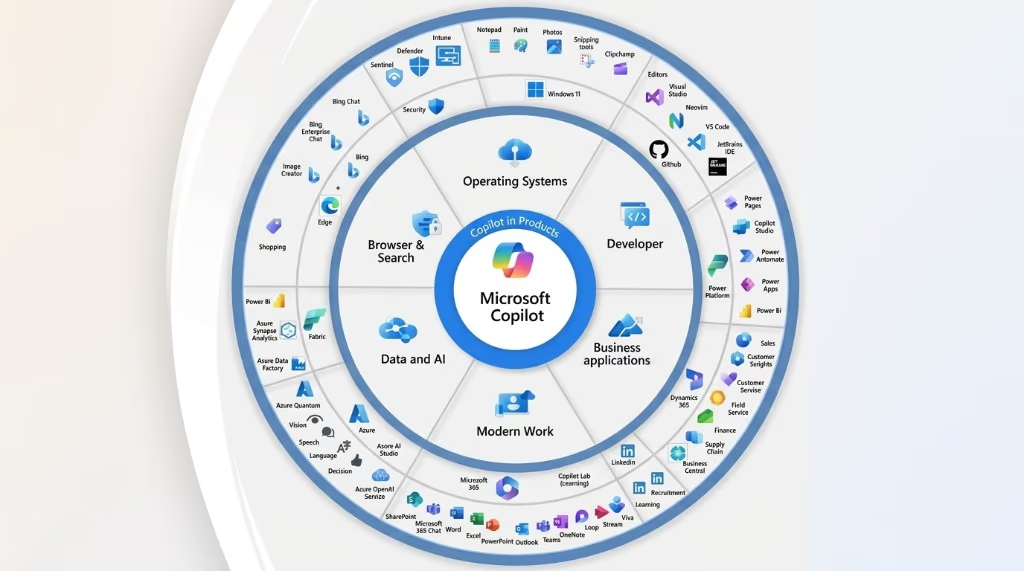
Microsoft AI is not one product. It is a sprawling ecosystem of AI-powered tools layered across nearly every product Microsoft makes – from Word and Excel to the Azure cloud, from Bing search to developer tools like GitHub. At the center of it all is a brand called Copilot, which Microsoft uses as a unifying name for its AI assistant experiences.
For context on the broader AI landscape, see our guides to what artificial intelligence is and what generative AI is.
The scale is significant. As of early 2026, Microsoft has reorganized its entire Copilot operation into a unified four-pillar structure: Copilot Experience (the user-facing products across Windows, Edge, Bing, and mobile), Copilot Platform (the developer APIs and infrastructure), Microsoft 365 Copilot (productivity apps), and Superintelligence (the foundational model research layer led by Mustafa Suleyman). The goal, in Satya Nadella’s words, is to move “from a collection of great products to a truly integrated system.”
The OpenAI partnership: where the AI actually comes from
To understand Microsoft AI, you need to understand the company’s relationship with OpenAI. This partnership is the foundation that made the current AI product wave possible.
A relationship that started in 2019
Microsoft first invested $1 billion in OpenAI in 2019, positioning itself as OpenAI’s exclusive cloud provider with Azure powering OpenAI’s workloads. The relationship deepened in January 2023 with a multiyear, multibillion-dollar extension of the partnership. By August 2024, Microsoft’s total investment in OpenAI had reached approximately $13 billion.
In October 2025, the arrangement was restructured: Microsoft converted its profit-sharing rights into a roughly 27% ownership stake in OpenAI’s new for-profit entity, with access to OpenAI’s models secured through at least 2032. This gives Microsoft long-term access to GPT-class models – the same models that power ChatGPT – while keeping OpenAI operationally independent.
What this means in practice
When you use Copilot in Word to draft a paragraph, or when you ask Bing a question and get a conversational answer, you are typically interacting with OpenAI’s models running on Microsoft’s Azure infrastructure. Microsoft does not just resell OpenAI’s technology – it integrates it into existing products and enterprise workflows, which is where most of its commercial AI value comes from.
Microsoft 365 Copilot: AI built into your daily apps
The most visible part of Microsoft AI for most people is Microsoft 365 Copilot – an AI assistant embedded into Word, Excel, PowerPoint, Outlook, Teams, and other Office applications. It works alongside your existing workflow rather than replacing the apps you already use.
Microsoft 365 Copilot is available at $30 per user per month (as of the time of writing, for enterprise plans). A separate Copilot Pro tier at $20 per month adds priority AI access and M365 app integrations for individual subscribers.
What “Wave 3” introduced
Microsoft has been rolling out updates in waves. The third major update introduced what Microsoft calls embedded agentic capabilities – meaning Copilot can now handle multi-step tasks independently, not just answer single questions. Two specific features define this shift:
- Agent Mode: Lets Copilot carry out complex, iterative tasks in Word and Excel autonomously – for example, running a series of data checks in Excel, fixing issues it identifies, and reporting back on what it changed.
- Copilot Cowork: A feature developed in collaboration with Anthropic that enables long-running tasks to be delegated to Copilot agents that plan and execute work across multiple tools. Microsoft positions this as letting users “spend more time on higher-value work.”
The Researcher agent – part of the Microsoft 365 Copilot suite – uses multi-model intelligence, combining GPT and Claude models, to cross-verify accuracy before returning results.
Copilot in Word, Excel, and PowerPoint
These are the three apps where Copilot’s practical value is most obvious for knowledge workers.
Word
In Word, Copilot can draft text from a short prompt, rewrite existing paragraphs in a different tone, summarize long documents, and now (via Agent Mode) iterate on a document structure across multiple steps. The draft-and-refine workflow is a core use case: give Copilot a brief, review what it produces, and ask for targeted changes in conversation-style follow-ups.
Excel
In Excel, Agent Mode is particularly practical. Copilot can analyze data, generate formulas, create charts from plain-English instructions, and run iterative checks to identify and fix issues in spreadsheets. Microsoft’s framing is that this “democratizes advanced Excel capabilities” – meaning users who are not formula experts can accomplish analytical tasks they could not before.
PowerPoint
Copilot in PowerPoint can generate slide decks from a text outline, suggest visual layouts, and summarize long presentations into key points. It can also help transform a Word document into a presentation with a single prompt.
Copilot in Teams and Outlook
For organizations that run their communication on Microsoft 365, Teams and Outlook integrations are where Copilot pays for itself most clearly.
Teams
Copilot in Teams offers two core functions that save time at scale. First, meeting summaries: after a meeting ends, Copilot can produce a structured recap including topics discussed, action items, and key decisions – even for users who did not attend the full meeting. Second, audio recaps and file summaries (added in October 2025 updates) help users process information after the fact without rewatching recordings.
In a meeting in progress, Copilot can answer questions like “What was decided about the Q3 budget?” using the live meeting transcript, without interrupting the conversation.
Outlook
In Outlook, Copilot can draft reply emails, summarize long email threads, and suggest tone adjustments. It also connects with calendar data so it can help schedule meetings with context about what was discussed in related threads.
Copilot Chat (formerly Copilot in Teams Chat)
A separate conversational experience called Copilot Chat – previously embedded in Teams and now also available at copilot.microsoft.com – lets users ask work-related questions across their Microsoft 365 data: emails, files, calendar, and Teams conversations. Think of it as a search interface that understands natural language and returns synthesized answers, not just links.
Session persistence, introduced in late 2025, allows conversations to continue after navigating away – a useful improvement for long research tasks.
Bing and Copilot Search
Bing was the first major Microsoft product to integrate OpenAI’s models publicly, launching its AI-powered search experience in February 2023. Since then, the Bing AI experience has been consolidated under the Copilot brand.
What Copilot Search is
Copilot Search is a dedicated search mode within the Copilot interface – accessible by selecting “Search” from a dropdown inside copilot.microsoft.com or within Bing. It delivers responses adapted to query complexity: short factual answers for simple questions, and longer synthesized summaries with cited sources for complex or analytical queries.
A notable design choice is transparency: Copilot Search responses include prominent, clickable citations showing exactly where information comes from. Users can view a consolidated source list in a side panel. Microsoft has stated this design is intended to support a healthier web publisher ecosystem – keeping original sources one click away.
Copilot in Edge and Windows
The Copilot experience also runs inside the Microsoft Edge browser (accessible via a sidebar) and in Windows (via the Copilot key on newer keyboards or the taskbar). In Edge, it can summarize web pages, help draft emails or documents in the browser, and answer questions about the current tab’s content.
The free tier
A free version of Copilot is available at copilot.microsoft.com. It is powered by GPT-4o with web search integration and does not require a Microsoft account to try basic features. This is how many users first encounter Microsoft AI – as a ChatGPT alternative that is bundled into Windows and Edge.
Azure AI: the enterprise platform under the hood
For businesses and developers building their own AI applications, Microsoft’s offering is Azure AI – a suite of cloud services that provides the infrastructure, models, and tools to build AI-powered products at scale.
Microsoft Foundry (formerly Azure AI Studio)
Microsoft has unified its developer-facing AI services under a platform called Microsoft Foundry (previously called Azure AI Studio, with Azure AI Services and Cognitive Services folded in). It targets three audiences:
- Application developers building AI-powered products on top of foundation models.
- ML engineers and data scientists who need model fine-tuning, evaluation, and custom dataset management.
- IT administrators managing governance, access controls, and compliance.
Microsoft Foundry gives these users access to OpenAI models (including GPT-class and reasoning models) through the Azure OpenAI Service, alongside models from third-party providers and open-weight models. As of early 2026, the Microsoft Marketplace lists over 11,000 prepackaged models and 4,000+ AI apps and agents available to enterprise buyers.
Azure Copilot agents
Microsoft has extended the Copilot brand into Azure operations itself. Azure Copilot is an agentic interface for cloud infrastructure management, featuring six specialized agents for tasks like migration planning, deployment, cost optimization, observability, resiliency monitoring, and troubleshooting. The aim is to automate operational tasks that would otherwise require specialist cloud engineers.
Enterprise security and compliance
Azure AI includes built-in responsible AI frameworks: prompt shields (to block prompt injection attacks), content safety filters, and unified role-based access controls. Microsoft has dedicated 34,000 full-time engineers to security across its products. For regulated industries – finance, healthcare, government – this compliance infrastructure is a significant differentiator versus building on less mature AI platforms.
Pricing model
Azure AI services are priced by usage: typically per 1,000 tokens processed (for language model APIs), per API call, or per compute-hour for custom training. Enterprise customers negotiate agreements directly. Pricing changes frequently – check the Azure pricing calculator for current rates.
GitHub Copilot: AI for developers
A distinct but important branch of the Microsoft AI ecosystem is GitHub Copilot, the AI coding assistant built into development tools like Visual Studio Code, Visual Studio, JetBrains IDEs, and Neovim.
GitHub Copilot works by sending context from your code editor – the file you are editing, surrounding code, and comments – to a large language model that returns suggested completions as “ghost text.” You can accept, modify, or ignore suggestions. It can complete entire functions, generate boilerplate, explain unfamiliar code, and suggest fixes for bugs highlighted by your IDE.
GitHub Copilot is documented in GitHub’s official docs and is available in Individual ($10/month), Business ($19/user/month), and Enterprise ($39/user/month) tiers – confirm current pricing on GitHub directly, as rates change. It is separate from Microsoft 365 Copilot and targets a developer-specific audience.
Pricing: what Microsoft AI actually costs
Microsoft offers AI across several pricing tiers depending on the product and use case. The following is a summary based on published pricing – always verify on Microsoft’s official pricing pages before making purchasing decisions, as these figures change.
| Product | Price | Who it is for |
|---|---|---|
| Copilot (free) | Free | Anyone with a browser or Windows device |
| Copilot Pro | $20/month | Individuals wanting priority AI access and M365 integrations |
| Microsoft 365 Copilot | $30/user/month | Enterprise and business users on M365 plans |
| GitHub Copilot Individual | $10/month | Individual developers |
| Azure AI (OpenAI Service) | Usage-based | Developers and enterprises building AI applications |
Note: enterprise Microsoft 365 Copilot requires an underlying Microsoft 365 Business or Enterprise subscription. The $30/user/month is the add-on cost, not the all-in price.
What it all means for you
The Microsoft AI ecosystem is large enough that the relevant entry point depends entirely on who you are.
If you are a casual user
The free Copilot at copilot.microsoft.com is a direct alternative to ChatGPT. It runs on GPT-4o, includes web search by default, and is already on your Windows 11 device if you have one. You do not need to pay anything to start. The main reason to pay for Copilot Pro is if you want AI assistance directly inside the M365 apps you already use for work.
If you are a Microsoft 365 user at a company
The $30/user/month Microsoft 365 Copilot add-on is the question you (or your IT department) should evaluate carefully. The core promise – summarize meetings, draft emails, analyze data without formula expertise – is real and works. The practical question is whether the time saved per user exceeds the cost. For knowledge workers who spend significant time on email, meetings, and documents, the ROI case is easier to make than for workers with different task profiles.
The biggest practical limitation as of now is not the technology but the change management: Copilot works best when users understand how to prompt it and when to trust versus verify its output.
If you are a developer
GitHub Copilot is a mature, widely used tool with broad IDE support. For most professional developers, it is worth trying at the Individual tier and evaluating the productivity benefit directly. Azure AI is the platform for teams building AI-powered applications at scale, with the advantage of enterprise-grade security and compliance infrastructure versus building on raw APIs.
If you are an IT or procurement decision-maker
The strategic question is whether to bet on Microsoft’s integrated ecosystem versus assembling best-of-breed tools. Microsoft’s advantage is that Copilot is embedded in software your organization likely already pays for, with governance and compliance controls already in place. The constraint is that you are operating within Microsoft’s product roadmap, not an open platform.
What is still evolving
The agentic capabilities – Copilot Tasks, Copilot Cowork, Agent 365, Agent Mode in Office – are the most significant direction of travel in 2026. These shift Copilot from a Q&A assistant toward a system that executes multi-step work autonomously. The products are real and shipping, but the workflows that benefit most from autonomous agents are still being defined by real enterprise deployments. This is an area worth watching, not waiting on indefinitely.
Frequently asked questions
What is Microsoft AI?
Microsoft AI is the collective name for Microsoft’s AI products, services, and infrastructure. It includes Copilot (the AI assistant across consumer and enterprise products), Microsoft 365 Copilot (AI in Word, Excel, Teams, and Outlook), Azure AI (the cloud platform for developers), GitHub Copilot (AI coding assistant), and Bing / Copilot Search. Most of these are powered by OpenAI’s models running on Microsoft’s Azure infrastructure.
Is Microsoft Copilot the same as ChatGPT?
No, but they are closely related. Both are powered by OpenAI’s GPT-class models. ChatGPT is OpenAI’s own consumer product. Microsoft Copilot is Microsoft’s interface – built on similar or the same underlying models but integrated into Microsoft’s software ecosystem (Windows, Edge, Word, Teams, etc.) and paired with Microsoft’s enterprise security and compliance infrastructure. The free tiers of both use GPT-4o as of 2025-2026.
How much does Microsoft 365 Copilot cost?
Microsoft 365 Copilot is priced at $30 per user per month as an add-on to an existing Microsoft 365 Business or Enterprise subscription. A cheaper tier – Copilot Pro at $20/month – is available for individuals and adds priority AI access and M365 app integrations. A free version of Copilot (without the full M365 integration) is available at copilot.microsoft.com. Pricing is subject to change; verify on Microsoft’s official site.
What does Copilot do in Teams?
Copilot in Teams can produce meeting summaries (topics covered, decisions made, action items) after a meeting, generate audio recaps, summarize files shared in a chat, and answer real-time questions during a meeting using the live transcript. It helps users who missed a meeting catch up quickly, and gives attendees a structured record without manual note-taking.
What is Azure AI and who is it for?
Azure AI is Microsoft’s cloud platform for building AI-powered applications. It includes access to OpenAI’s models (via the Azure OpenAI Service), tools for fine-tuning and evaluating custom models, and governance and security infrastructure for enterprise deployments. It targets application developers building AI products, ML engineers working on custom models, and IT administrators managing AI governance. Pricing is usage-based rather than subscription-based.
Does Microsoft own OpenAI?
Microsoft holds approximately 27% of OpenAI’s for-profit entity (OpenAI Group PBC) as of October 2025, following a restructuring that converted earlier profit-sharing rights into an ownership stake. However, OpenAI is not a Microsoft subsidiary. The OpenAI Foundation (a nonprofit) remains the controlling entity. Microsoft has secured access to OpenAI’s models through at least 2032, and Azure is OpenAI’s exclusive cloud infrastructure provider.
Is there a free version of Microsoft AI / Copilot?
Yes. A free version of Copilot is available at copilot.microsoft.com and is built into Windows 11 and Microsoft Edge. It runs on GPT-4o with web search and does not require a paid subscription for basic use. The free tier has usage limits and does not include the deep integrations with Word, Excel, Teams, and Outlook – those require Copilot Pro or Microsoft 365 Copilot.
Sources and further reading
- Microsoft, Announcing Copilot leadership update (March 2026): blogs.microsoft.com
- Microsoft, Powering Frontier Transformation with Copilot and agents (March 2026): microsoft.com/microsoft-365/blog
- Microsoft, Vibe working: Introducing Agent Mode and Office Agent (September 2025): microsoft.com/microsoft-365/blog
- Microsoft, Bringing the best of AI search to Copilot (November 2025): microsoft.com/microsoft-copilot/blog
- Microsoft Learn, What is Microsoft Foundry?: learn.microsoft.com
- CNBC, Rise of OpenAI: Microsoft’s $13 billion artificial intelligence bet (August 2024): cnbc.com
- Microsoft, Microsoft and OpenAI extend partnership (January 2023): blogs.microsoft.com
- Microsoft Tech Community, What’s new in Microsoft 365 Copilot – October 2025: techcommunity.microsoft.com